Don’t Forget to Set VISUAL and EDITOR
I have mastered vim. I’m capable of entering insert mode, exiting insert mode, and saving files. I’m even able to search both forwards and backwards. As skilled as I am, I’m even better with other code editors, which is why I’ve set EDITOR and VISUAL to my preferred text editor.
I don’t know if you’ve ever watched someone who isn’t comfortable with vim try to edit something when they’ve been dumped into it from a command like git commit, kubectl edit, gh pr create, crontab -e, or any other similar command. It’s painful.
The reason I know is because I was someone who spent almost a decade bumbling around in vim when my shell popped me there before I spent the minute to figure out that I could configure that behavior in my ~/.zshrc. Oops!
if [[ -n $SSH_CONNECTION ]]; then
    export EDITOR='vim'
else
    # I've been enjoying helix recently: https://docs.helix-editor.com/
    # it's a light-weight modal editor. The main difference compared to vim is that it does "selection then action" rather than "action then selection" which I find easier to work with
    export EDITOR='hx'
    export VISUAL='hx'

    # VSCode-specific note: on Macs, you may need to open the VSCode command palette and run `Shell Command: Install 'code' command in PATH` to make `code` runnable from the command line
    # export VISUAL='code --wait'
fi
There are two values you can set, EDITOR and VISUAL, but I think most people will probably want them set to the same thing:
- VISUAL = the main fullscreen editor that most programs will try first
- EDITOR = the fallback
If you set VISUAL, you probably don’t need to set EDITOR, but I set it anyways, just in case something isn’t well-behaved.1
Speaking of EDITOR, that’s what fc and CTRL + X, CTRL + E will use if you want to jump into a nice editor from your shell. I learned about both from the great article Shell Tricks That Actually Make Life Easier (And Save Your Sanity).
At this point though, we still have a massive problem: this is operating in the primitive world of 2025. That was a savage world where you had to think and write things down in a text editor by typing. With your fingers. And brain. Better for you if you instead outsource both thinking and writing, but that requires a little bit of setup.
Let’s start off with something easy so we can see how EDITOR behaves. We could do EDITOR=echo, but it’s pretty easy to set up a custom function:
function my_editor () {
  local filename="$1"
  cat <<-END_OF_HEREDOC
filename: ${filename}
contents:
$(cat ${filename})

end_of_file_contents

END_OF_HEREDOC

    echo "echo 'I rewrote the file'" > "$filename"
}
Then in the terminal:
$ true # this is the command we'll be "editing"
$ EDITOR=my_editor fc
filename: /tmp/zshtpSAfF
contents:
true # this is the command we'll be "editing"

end_of_file_contents

echo 'I rewrote the file'
I rewrote the file
That’s all we need to write a quick little wrapper so that we can take our hands off the wheel:
function my_editor () {
    local filename="$1"
    claude --permission-mode acceptEdits --add-dir /tmp -p "Please look at ${filename} which will have been created by a program like git, fc, kubectl edit, or gh and make appropriate edits to it."
}
Now, we can use fc and it only takes about 20s to fix a command! Whoa.
$ tru && echo "hello, world"
zsh: command not found: tru
$ EDITOR=my_editor fc
Fixed `tru` → `true`.
true && echo "hello, world"
hello, world
But what if claude happens to get something wrong? It’s possible (at least in theory), so we’ll want to use something like expect or tmux to drive the TUI and start us off with a nice prompt.
function my_editor () {
    local filename="$1"
    local filename_contents="$(cat $filename)"
    echo "$filename_contents"
    local session_name="claude-$(date +%Y%m%d-%H%M%S)"
    tmux new-session -d -s "$session_name" 'claude --permission-mode acceptEdits --add-dir /tmp'
    sleep 1
    tmux send-keys -t "$session_name" "@${filename} has the following contents:"
    tmux send-keys -t "$session_name" C-j
    tmux send-keys -t "$session_name" C-j
    tmux send-keys -t "$session_name" "${filename_contents}"
    tmux send-keys -t "$session_name" C-j
    tmux send-keys -t "$session_name" C-j
    tmux send-keys -t "$session_name" "Please edit @${filename} by "
    tmux attach -t "$session_name"
}
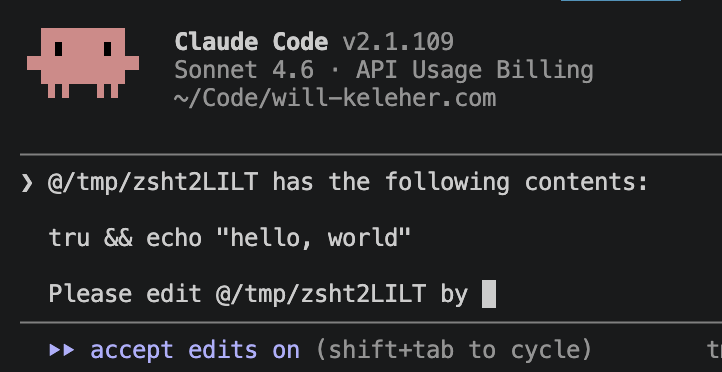
Configuring EDITOR and VISUAL like this will easily 10x your shell productivity, so be sure to remember me when you get your massive yearly bonus and promotion!
I’m still living in the past with VISUAL=hx, but even that has made my daily work a tiny bit more ergonomic, and if you weren’t aware of EDITOR and VISUAL, I hope configuring them does the same for you.